Chamber

Shoot through the film look

iOS · 2026

live on App Store →
iOS camera film photography on-device
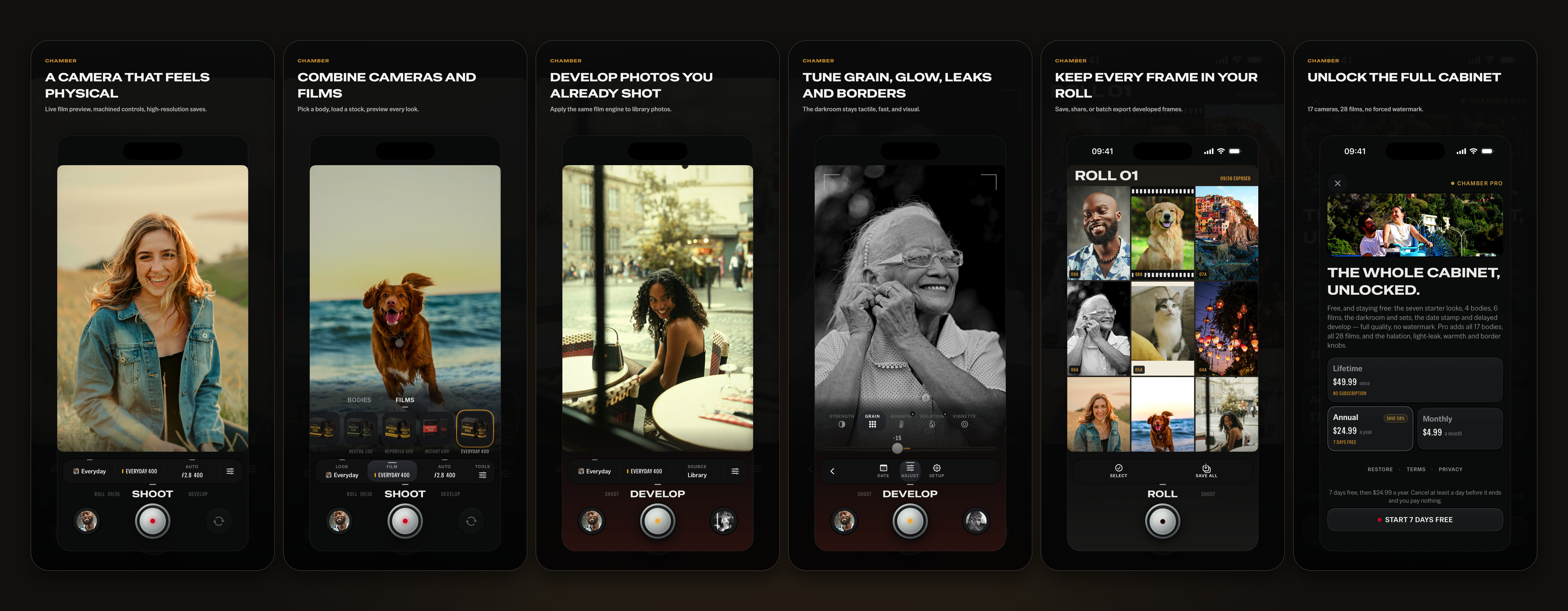
Chamber 2.0 on iPhone, in six screens: a camera that feels physical, combining cameras and films, developing photos you already shot, tuning grain, glow, leaks and borders, keeping every frame on the roll, and Chamber Pro.

Chamber turns your iPhone into a tactile film camera: a camera, a darkroom and a roll, under your thumb. Choose a look, see it live in the viewfinder, and keep every photo in high resolution without a watermark. Develop photos you already have through the same engine.

It's built around the feeling of a real photographic object: machined controls, amber readouts, film swatches, date stamps, light leaks, grain, borders, and a contact-sheet roll. Seventeen camera bodies combine with twenty-eight films for 476 combinations.

Three rooms, one dock
Turn the dial under your thumb to move between SHOOT, DEVELOP and ROLL. The picture advances like a strip of film as you turn, so you see the room you are going to before you let go.
One tray for looks, bodies and films
Tap LOOK or FILM and a row of cards rises over the rail. A tap applies a card at once. Change a body, a film or a knob and the look becomes your own; pull LOOK up to go back to the named look, and your own pairing is kept. Keep the looks you love and share them as files.
Manual when you want it
Pull EXPOSURE up for manual. On cameras that support it, set ISO, shutter speed and focus on the sensor — and white balance on some bodies — on a dial that clicks under your thumb. Aperture and depth of field are simulated. A body that sets its own exposure says so, and offers one with a dial.
A darkroom in place
Develop the newest frame from your roll, a photo from your library or a set of several at once, through any look. Your negative is kept beside every frame, so any frame can be developed again on another film or body.
The roll
A contact sheet of everything you have shot and developed. Open a frame to see what it was exposed at and how it was made, save it to Photos, share it, or develop it again. The counter rolls over at 36 — nothing is ever lost, and there's no cap on how many photos you save.
Feel
Every body winds on in its own way, and each change has a haptic of its own. Choose Full, Light or Off in Settings.
Lessons on the live camera
The first time you open Chamber, a card and three short lessons run on the live camera. Skip ends them, and you can replay them from Settings.
High resolution, no watermark
High-resolution exports with no watermark and no save cap, even on the free tier. Save as JPEG, which opens everywhere, or HEIC, which is smaller.

Chamber is a private camera. Every photo you shoot or develop is processed entirely on your device using Apple's Core Image framework, and never leaves it. There are no accounts, no ads, no tracking SDKs, and no third-party analytics.

The camera feed is rendered live in memory and never recorded or transmitted. Chamber asks to see your photos only when you open the library in DEVELOP, with the system's own dialog, and shows them on your device only — nothing about your library leaves it, and Chamber never scans or indexes it in the background. Saving a photo asks for permission to add to your library. Product events stay on your device and are never sent anywhere, and no advertising identifiers are collected.

Read the full privacy policy →

Free to download. The free tier includes the seven starter looks, 4 camera bodies, 6 films, the darkroom and sets, the date stamp and delayed develop, and high-resolution exports with no watermark. Chamber Pro adds all 17 camera bodies, all 28 films, and the halation, light-leak, warmth and border knobs. You can load any Pro body or film and see it live in the viewfinder; taking or developing a photo with it needs Chamber Pro.

Chamber Pro Annual
The full cabinet, with a 1-week free trial for new subscribers.
$24.99 / year
Chamber Pro Monthly
Same Pro features, billed monthly. No trial.
$4.99 / month
Chamber Pro Lifetime
The full cabinet plus future drops, forever — one payment, no renewal.
$49.99 one-time

Prices shown are US App Store prices; your local price is set by Apple and appears in the app before you purchase. Manage or cancel any time in Settings → Apple Account → Subscriptions.

Made by Kiryl Zhukouski in Poznań, Poland. Chamber is the camera app I wanted on my own phone — a photographic object you operate, not a filter you apply afterward. If you have feedback, write to kirylapps@gmail.com.

Chamber is independent and is not affiliated with, sponsored by, or endorsed by any camera, lens, film, or imaging brand.